The Best Digital Ordering System for Restaurants in Singapore

KPay


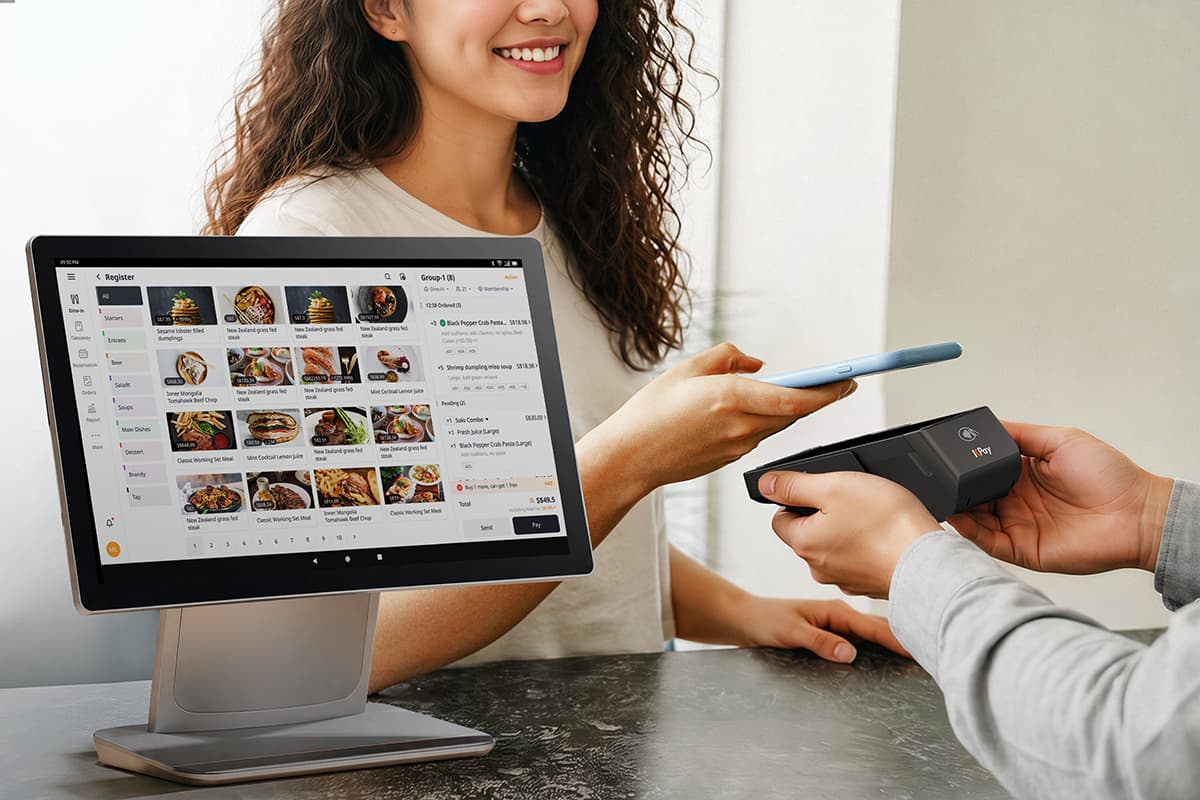
Solve the labor crunch with a digital ordering system for your restaurant. Learn about key features to look for in a digital ordering system and more.
Key Takeaways:
- Use KPay F&B POS to bypass the labour crunch and focus your human staff on high-value hospitality.
- Invest in professional food photography for your digital menu; crisp images can improve interest in specific dishes.
- Choose a provider that unifies your POS, ordering system, and payments to avoid having your data across multiple platforms.
The Singaporean F&B landscape often faces two major challenges: high operational costs and a tightening labour market. For restaurant owners, this means that a digital ordering system for your restaurant becomes even more important as it becomes the backbone of a profitable business. As such, transitioning to digital is the most effective way to protect your margins and improve customer satisfaction.
Why Your Restaurant Needs a Digital Ordering System
Digital systems help to transform the dining experience by reducing human error and accelerating service. Kitchen staff are less likely to misunderstand the handwriting on a notepad used to take down orders with digital systems, and both the ordering and payment process can also be sped up with various features that these digital systems offer.
In Singapore, the benefits are even more specific:
- Solving the Manpower Crunch: With stricter dependency ratios for foreign workers, digital ordering allows one server to manage twice as many tables by removing the "order-taking" bottleneck.
- Boosting Average Order Value (AOV): Digital menus don't forget to upsell. By using high-quality visuals and automated prompts such as "Would you like to add a drink for $2?", restaurants often see a 15–20% increase in spend per head.
- Instant Cash Flow: Modern systems integrate directly with PayNow and GrabPay, ensuring funds can be transferred to your account faster than traditional 3-day bank cycles.
Key Features to Look For in a Digital Ordering System
When evaluating a digital ordering system for your restaurant, ensure it meets these requirements:
Hybrid QR and Kiosk Capabilities
Modern diners value flexibility. Your system should offer Scan to Order (QR code) for dine-in guests and Self-order Kiosks for quick-service queues. While some businesses may prefer customers to adopt their app, having a seamless web-app experience where no app download is required is often critical for high adoption rates.
Scan to Order
A Scan to Order system is a contactless digital solution that allows customers to view a menu, place orders, and pay for their items by scanning a QR code. This is where food photography matters — having crisp, professional photos of your dishes can help to increase customers' interest in specific dishes when placing their orders.
Additionally, most Scan to Order systems offer various payment setups, including pay-before-order and pay-after-dining. A pay-before-order setup is common in fast-casual cafes, where the customer must pay before the order is sent to the kitchen. On the other hand, a pay-after-dine setup is more common in full-service restaurants, where the customer orders throughout the meal and brings the QR code to the payment counter when they are ready to make payment and leave.
How the Process Works
The system typically follows a four-step loop:
- Scanning: A customer scans a unique QR code located on a table in a restaurant.
- Browsing: The phone's browser opens a digital menu. This is usually a "web app," meaning the customer doesn't need to download anything from an app store.
- Ordering: The customer selects their items, adds modifiers, like "extra cheese" or "no onions", and hits submit. This order is instantly sent to the kitchen or the staff's tablet.
- Payment: Depending on the setup, the customer can pay immediately via the phone using Apple Pay, Google Pay, or PayNow, or at the end of the meal.
Key Components
To function effectively, a Scan to Order system requires three main technical layers:
- Customer Interface: The mobile-optimised digital menu.
- Merchant Interface: A POS (Point of Sale) system or a Kitchen Display System (KDS) where staff receive and manage incoming orders.
- Payment Gateway: The secure backend that processes transactions between the customer's wallet and the merchant's bank account.
Why Businesses Use It
In markets like Singapore and Australia, Scan to Order is increasingly becoming a necessity due to several strategic advantages:
- Solving the Labor Shortage: It allows a lean crew to manage a large floor because staff no longer spend time walking back and forth to take orders or deliver physical bills.
- Increased Revenue (AOV): Digital menus are often set up to suggest add-ons for customers. While a waiter might forget to ask if you want fries, a digital system is programmed to prompt every customer with an upsell, often increasing the AOV.
- Order Accuracy: Because the customer selects the items themselves, there is a significant reduction in "wrong order" disputes caused by miscommunication between staff and the kitchen.
- Dynamic Updates: Unlike paper menus that cost money to reprint, digital menus can be updated in seconds to reflect out-of-stock items or "Happy Hour" price changes.
KPay POS for Businesses
KPay POS is designed with F&B businesses in mind and integrated with the KPay ecosystem so that you can access all you need in one place. We help your business to operate more efficiently with a fast, reliable and modern POS including built-in tools, so you can focus on growing the business.
KPay POS offers various features:
- Unified POS System: Handle various business operations, from taking orders to accepting payments, and even accessing reports, via a single platform.
- High-speed & reliable: With a fast and reliable POS system that's capable of processing high checkout volume even during peak hours, you can capture every dollar with ease.
- Professional support 24/7: You won't have to navigate the process alone as KPay offers pre-onboarding consultation to help merchants identify the features suited for their needs, as well as 24/7 post-onboarding support.
- Streamlined usability: Unlike traditional systems with complex, legacy interfaces, the KPay POS features a modern, intuitive design. This ensures that even new staff can navigate the system confidently with minimal training.
KPay POS also supports scan-to-order, with the option of static and/or dynamic QR codes for customers to view menus and place their orders. Additionally, with offline mode, you'll be able to continue processing orders even during unforeseen network outages, enabling you to capture every dollar.
Contact our sales team today to find out how KPay POS can help to streamline your business operations.
Self-order Kiosks
Self-order Kiosks are standalone, interactive touch-screen devices that allow customers to browse a menu, place orders, and make payments independently.
While most commonly seen in fast-food chains, they are becoming increasingly popular for quick-service restaurants across Singapore and Australia.
How Self-Order Kiosks Work
The kiosk acts as a digital interface between the customer and the business's backend operations. Through the kiosk, the customer navigates through categories and items. The system provides clear options for modifications such as upsize a beverage to a large size, which ensures the customer gets exactly what they want.
When it comes to payment, most kiosks also consist of integrated card readers and QR scanners that allow instant checkout via credit cards, mobile wallets or local methods.
Once payment has been made, the kiosk prints a receipt with an order number and simultaneously sends the order to the Kitchen Display System (KDS) or a staff tablet.
Strategic Benefits for Businesses
Implementing kiosks offers various strategic benefits:
- Queue Management: Kiosks act as extra "cashiers" during peak hours, drastically reducing wait times and preventing customers from leaving due to long lines.
- Labor Efficiency: Staff can be moved from behind the counter to the front of house to focus on food quality and customer service, or to the kitchen to handle the increased volume of orders.
- Language & Accessibility: Most kiosks offer multilingual interfaces, which is essential in international hubs like Singapore to serve tourists and diverse local demographics accurately.
Unified Payment Integration
As Singapore moves towards a cash-lite society and with the emergence of multiple digital payment methods, customers now expect that businesses are able to accept their payment method of choice. As such, merchants should ensure that their selected payment device can support:
- PayNow: For instant bank transfers.
- Local Wallets: GrabPay, ShopeePay, and DBS PayLah!.
- International Wallets: Alipay and WeChat Pay to capture tourist spending.
KPay Terminal Pro offers various features to help your business succeed:
- Accepts 20 major payment methods seamlessly on one portable device.
- No subscription fees, annual fees or terminal rental fees.
- 24/7, 365-day customer support to ensure merchants get up and running quickly should any issues occur.
With KPay Terminal Pro you can effectively meet your customer's needs for speed, versatility of payment methods, and ensure secure transactions — all with one device.
Kitchen Display System (KDS) Integration
A digital order is only as fast as your kitchen. Ensure your ordering system syncs in real-time with a KDS to eliminate paper tickets and reduce miscommunication.
A KDS is a digital menu board for your kitchen staff that replaces traditional paper tickets and printers. When an order is placed, whether via a server’s handheld device, a self-order kiosk, or an online delivery platform, it is instantly transmitted to a screen in the kitchen. The system organizes these orders into clear, color-coded tiles that display the dish name, special modifications, and a live timer. This ensures that chefs have a real-time, centralised view of the workload, reducing the risk of lost orders or misread handwriting.
Beyond just displaying orders, a KDS automatically routes specific items to the correct preparation stations. For example, sending steaks to the grill station and salads to the pantry. Advanced systems can also manage meal pacing, which holds back items with short cook times so that every dish for a single table is ready at the exact same moment. For managers, the KDS provides invaluable data, tracking the average time it takes for a dish to be prepared, allowing for precise performance monitoring and more efficient staffing during peak hours.
Future-proof Your F&B Business
Success in Singapore’s dining scene requires more than just great food; it requires operational intelligence. By implementing a robust digital ordering system for your restaurant, you can optimise your operational efficiency, increase your revenue, and provide a seamless dining experience for your customers.
Contact our sales team today for a consultation on the best digital ordering setup for your business.

Recommended articles
The Ultimate Merchant’s Guide to Payment Methods
Checklist: Opening a Store in Singapore
Merchant's Guide: Renting a Store in Singapore