



In Hong Kong's fast-moving business environment, adaptability is the key to sustainable growth. For most merchants, dedicated POS terminals remain the backbone of daily operations, especially at fixed counters where speed, familiarity, and reliability matter most. At the same time, evolving customer expectations and operational realities are prompting businesses to look for ways to extend their payment capabilities beyond the counter.
This is where Tap to Pay (TTP) comes in—by enabling smartphones to accept contactless payments, businesses now have an alternative method for processing payments. This is especially useful for small businesses where the owners often manage various aspects of their business on their own.
However, Tap to Pay plays a supplementary role for businesses looking to grow. It acts not as a replacement for POS terminals, but as a flexible, on-demand extension of an existing payment setup. By enabling smartphones to accept contactless payments, Tap to Pay helps merchants handle peak periods, mobile scenarios, and unexpected disruptions more smoothly, while continuing to rely on their terminals for core transactions. Below, we explore how adding Tap to Pay to your payment toolkit helps address common operational scenarios across different industries.
1. Eliminating POS Terminal Bottlenecks During Peak Hours
For many established merchants, peak-hour congestion isn’t caused by inefficient terminals, it’s caused by demand temporarily exceeding fixed checkout capacity. Whether it’s a lunch rush in a Central bistro or a weekend crowd in a Tsim Sha Tsui boutique, having one or two shared POS terminals can mean staff must wait their turn to collect payment. This leads to longer queues, slower table turnover, and unnecessary pressure on frontline teams during the busiest moments of the day. Tap to Pay helps relieve this pressure without changing or replacing your existing POS setup. Instead of walking back and forth to a central POS station to retrieve a shared terminal, staff can accept payments directly at the table or point of interaction using Tap to Pay-enabled devices. This allows merchants to temporarily expand payment capacity during peak hours, while continuing to use their terminals as usual during quieter periods. This approach benefits not only F&B operators, but also service-based businesses such as beauty salons, where staff can accept payment immediately after a treatment, directly in the room, without disrupting the customer experience. By smoothing peak-time payment flows, merchants can maintain service quality and operational rhythm without committing to additional fixed hardware.
A common concern merchants raise is control and security. Many worry about staff accepting payments on mobile devices or assume Tap to Pay is less secure than traditional POS terminals. In reality, Tap to Pay uses the same card network standards, encryption, and PCI-compliant infrastructure as physical POS terminals. Access can be restricted to authorised staff, transactions are logged in real time, and usage can be limited to specific periods or scenarios. For most merchants, Tap to Pay functions as a controlled extension of their POS terminal environment, rather than a separate or unmanaged channel.
2. The Ultimate Hardware Safety Net
Even the most reliable POS terminal can occasionally be unavailable, whether due to charging, software updates, connectivity fluctuations, or something as simple as running out of receipt paper. When a business relies on a single terminal, these moments create a single point of failure, especially during busy service windows.
Tap to Pay provides a practical operational safety net. When a physical terminal is temporarily unavailable, staff can continue accepting payments immediately on a supported smartphone—without setting up spare hardware, swapping batteries, or configuring additional networks. Because Tap to Pay runs on devices already in daily use, it acts as a ready fallback that preserves business continuity, rather than an alternative system that needs separate maintenance.
Connectivity is another area where Tap to Pay can complement traditional terminals. Modern smartphones often feature more advanced 4G and 5G antennas, which can be useful in locations with inconsistent coverage, such as basement retail units, industrial buildings, or back-of-house areas. In these scenarios, Tap to Pay provides an additional way to keep transactions moving, reducing the risk of delays or abandoned sales.

3. Mobile, Lean Operations & Sustainable Growth
For merchants handling small-ticket transactions or operating in high-volume environments, operational efficiency extends beyond the checkout counter. While fixed terminals are ideal for in-store use, managing additional devices, chargers, cables, and consumables can become more complex in mobile or temporary settings such as pop-up markets, trade fairs, or off-site sales.
Tap to Pay helps simplify these edge cases. Digital-first receipts, delivered via email or QR code, reduce reliance on thermal paper without affecting in-store terminal workflows. Over time, this lowers consumable costs and supports more environmentally conscious operations, while still giving customers flexibility in how they receive receipts.
For wholesalers, pop-up merchants, and mobile sellers, Tap to Pay also reduces the need to transport a full "payment kit." By accepting payments on a smartphone already in use, merchants can minimise setup time, reduce failure points, and operate more lightly on the move—while continuing to rely on terminals for permanent locations.
4. Reducing the Administrative Burden
End-of-day reconciliation is a shared challenge across all payment environments. As businesses add more payment touchpoints, including terminals, mobile devices, temporary setups, the administrative workload can increase if systems are not unified.
Tap to Pay integrates into the same payment ecosystem as your POS terminals, ensuring that all transactions are recorded, synced, and reported in the system in real time. This removes the need to reconcile separate systems or manually cross-check records, resulting in a faster close-of-day process and more reliable financial data.
Managers benefit from consolidated visibility across devices and locations, whether payments are taken at a fixed counter or on a mobile phone. This unified view supports better decision-making without adding operational complexity.
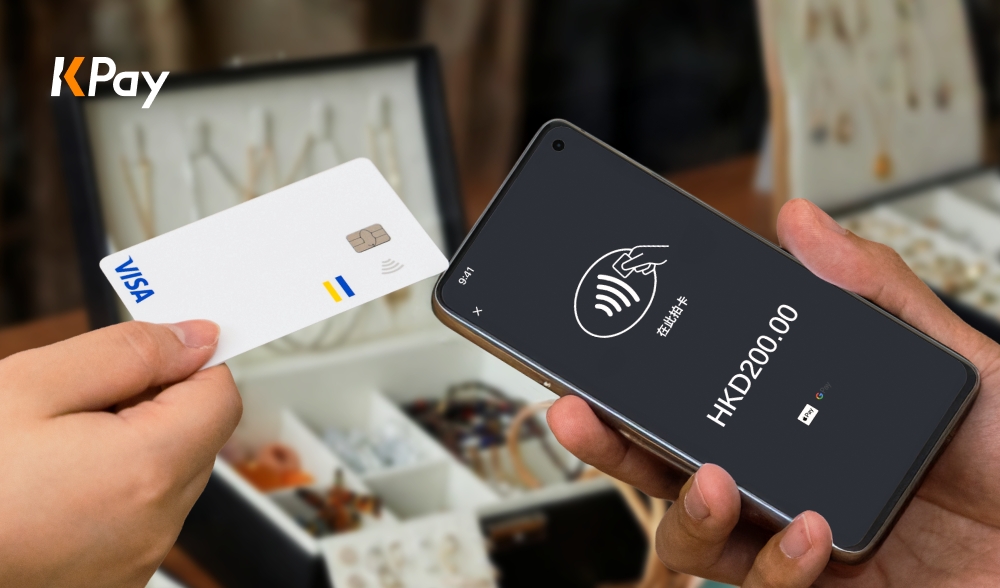
Tap to Pay with KPay
For many businesses, Tap to Pay is designed to work alongside your payment terminals, not replace them. Merchants can continue using terminals as their primary checkout solution, while adding Tap to Pay where flexibility, mobility, or backup is needed. There’s no need to purchase new hardware, overhaul workflows, or retrain teams; Tap to Pay fits naturally into existing operations. Additionally, there is a cashier mode where there isn't a need for a registered KPay account to start accepting payments. This mode enables staff to accept payments via Tap to Pay, but does not allow them to view all business data, keeping your business data safe.
This makes it suitable for both small businesses seeking a simple way to accept payments, and larger merchants looking to improve efficiency during peak periods or across multiple touchpoints. Because Tap to Pay integrates into KPay’s platform, transactions from both terminals and mobile devices are managed together, keeping reporting and reconciliation straightforward.
Exclusive offer: New merchants can enjoy 0.2% Visa and Mastercard monthly transaction fee rebate in the first 12 months. Sign up now to start receiving payments effortlessly.
How to Apply for Tap to Pay as an Existing KPay Merchant
If you're already an existing KPay merchant, applying for Tap to Pay is a simple and quick process:
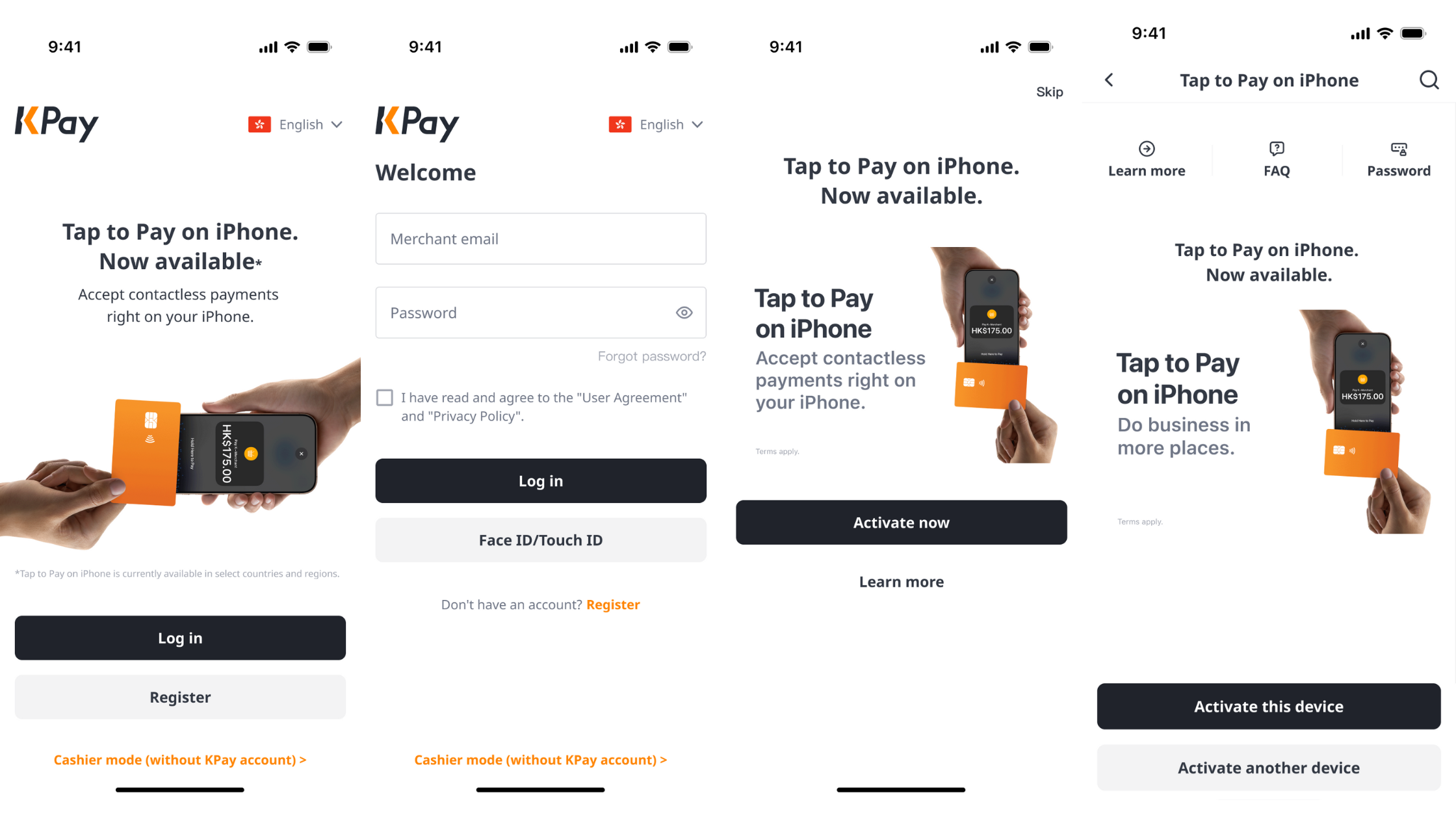
- Open the KPay Merchant App
- Log in to your KPay Merchant account
- Tap on the Tap to Pay banner on the homepage, and select on "Activate now"
- Activate Tap to Pay for the device you're currently using, or activate it on your preferred device
- You're ready to use Tap to Pay for your business!
How to Activate Cashier Mode?
Cashiers without access to KPay accounts can also activate Tap to Pay to start accepting payments — here's how:
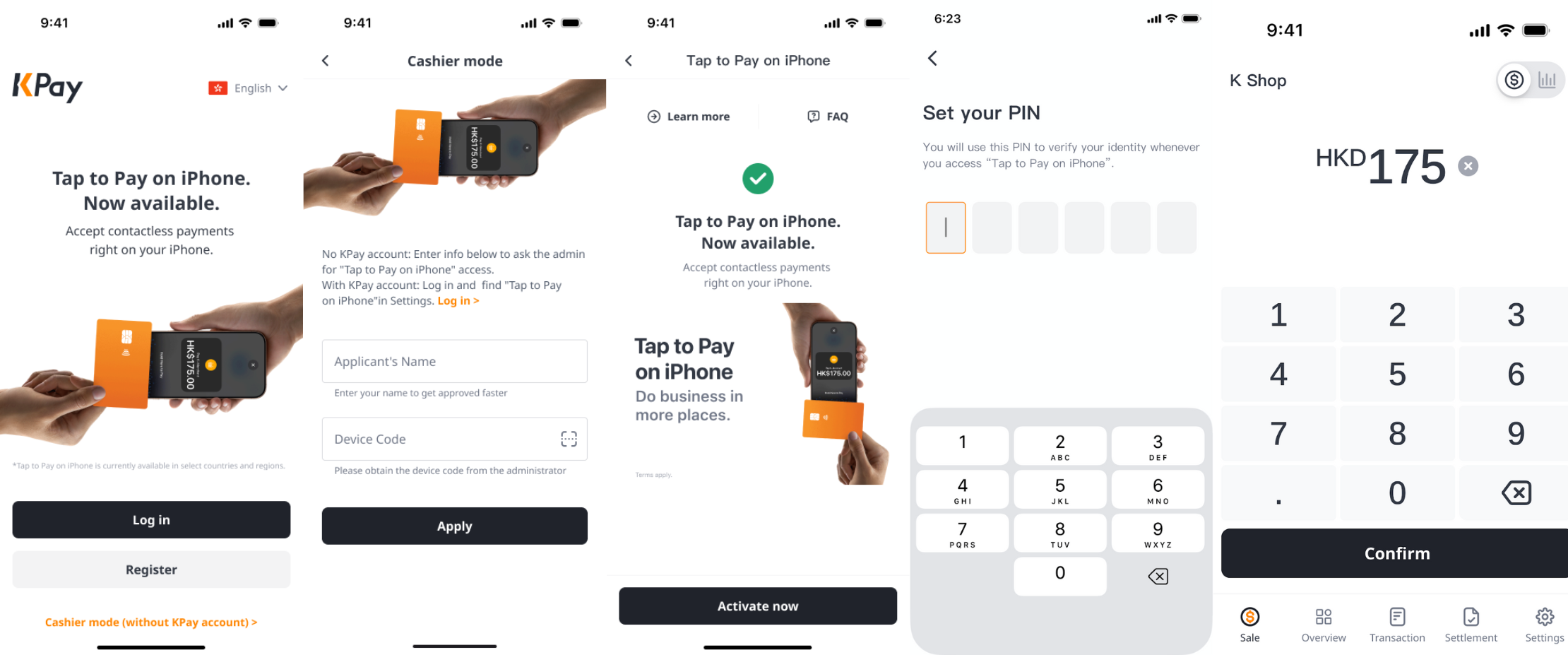
- Open the KPay Merchant App, and tap "Cashier mode (Without KPay account)" at the bottom of the screen.
- Enter the device name and device code, or scan the QR code to link your device.
- Tap "Activate now" after your manager has approved on the app.
- Follow the instructions to set up your PIN.
- Start accepting payments using the linked device.
Hardware Power Meets Software Agility
For modern Hong Kong merchants, the question isn’t "POS terminal or smartphone." It’s how to combine both to create a payment setup that is resilient, flexible, and ready for growth. By pairing reliable POS terminals with Tap to Pay, businesses gain the stability of dedicated hardware and the agility to serve customers wherever and whenever demand arises—without compromise.